What the extension does
A cow overlay on the real X timeline. Install from Chrome, then trade without leaving the post.
moo-ve is listed on the Chrome Web Store. Click Add to Chrome. Open x.com. The cow sits on the feed.
Cards appear under tweets with $cashtags or a Pump.fun CA. Buy / Sell opens the dock. Double-click or right-click a $cashtag to quick-buy the default SOL amount from the popup. Quotes and swaps go through Jupiter. Poster gets half the fee.
Phantom, Solflare, Backpack, or Jupiter Wallet on Solana. MetaMask or Phantom EVM on Robinhood Chain. Hit Buy. The wallet still has to approve the fill.
How to use it
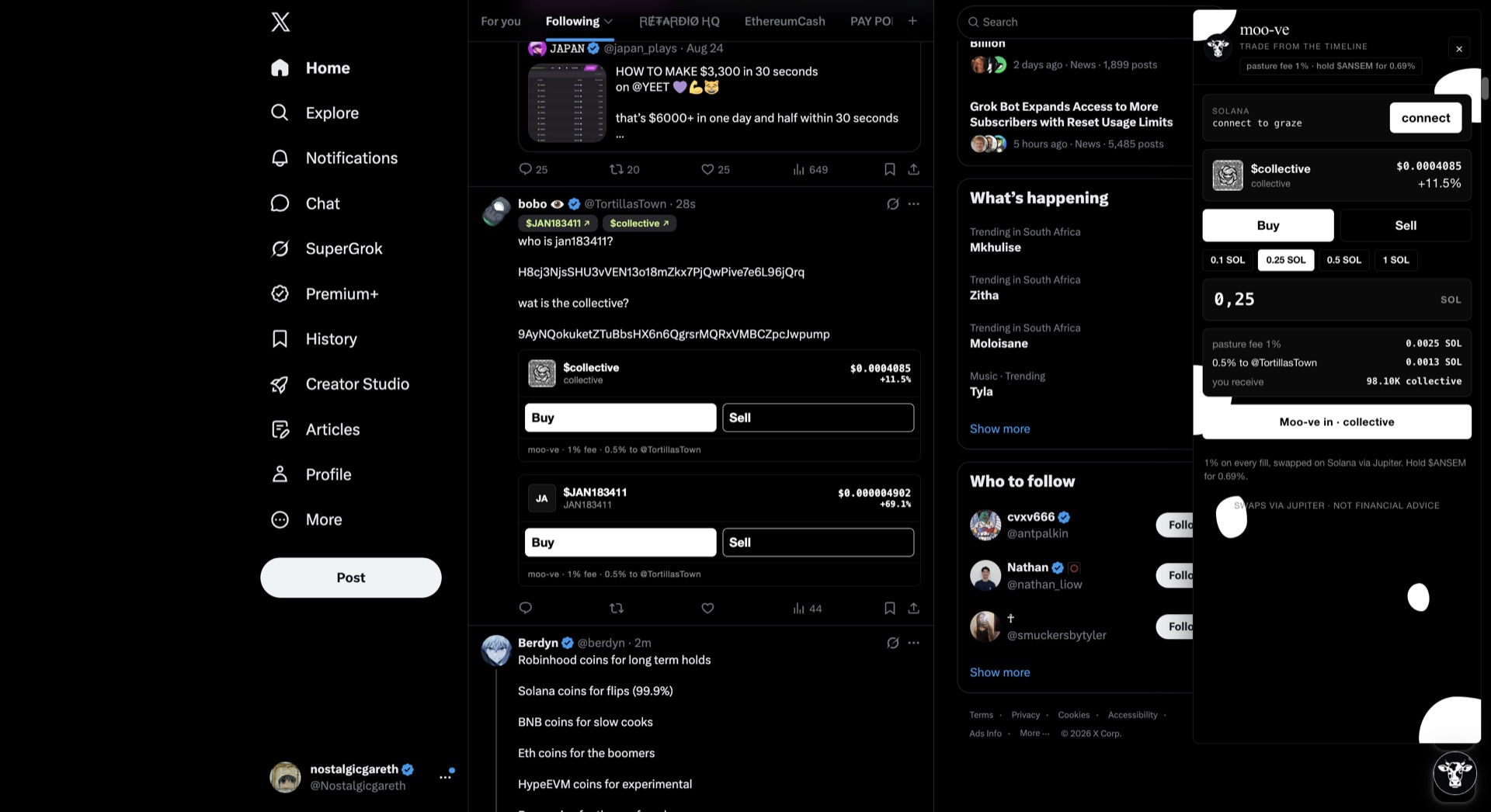
Buy from a post
Cards appear under tweets with $cashtags or a Solana CA. Buy / Sell opens the dock. Double-click or right-click the $cashtag to buy the default SOL amount. Poster gets half the fee.
Connect a wallet
Phantom, Solflare, or Backpack on Solana — quotes and swaps go through Jupiter. MetaMask or Phantom EVM on Robinhood Chain — swaps go through Kyber. No extra login — just the wallet.
More EVM chains
Robinhood Chain works today with MetaMask or Phantom EVM. More EVM chains are coming soon — not live yet.
Practice first
The pasture demo is a fake X feed with live quotes. No install, no wallet needed.
If it doesn’t show up
Is this on the Chrome Web Store?
Yes. Chrome accepted the listing. Add moo-ve from the store, then open x.com. The overlay does not install from this site — Chrome only allows that from the store.
What does the extension actually do?
On x.com it finds $cashtags and Pump.fun contract addresses in the timeline and puts Buy / Sell on the tweet. Double-click or right-click a $cashtag to quick-buy a preset SOL amount (set in the extension popup). Connect a Solana wallet. Quotes and swaps go through Jupiter. Default fee is 1% (half to the poster). You sign every fill. Not financial advice.
Which chains and wallets?
Solana: Phantom, Solflare, Backpack, or Jupiter Wallet, with swaps through Jupiter. Robinhood Chain: MetaMask or Phantom EVM, with swaps through Kyber. More EVM chains are coming soon. The fee is 1%, half to the poster.
No cow / no buy buttons
Install from the Chrome Web Store and open x.com. Or try the pasture — a fake X feed with live quotes, no install.
What’s the $MOO CA?
$MOO on Solana: g5Z6scsiHKmzC1ojxbSGaXKoqBy8zP19QJ81Z7Tpump
Buy on pump.fun · Dexscreener. Only trust this CA. Not financial advice.